;}.cls-4{fill:%23faa41a;}.cls-5{fill:%232fb34d;}.cls-6{fill:%2364c6bc;}%3c/style%3e%3cclipPath%20id='clip-path'%20transform='translate(32.68%20-94.69)'%3e%3cpath%20class='cls-1'%20d='M10.06,151.33v52.21a20.28,20.28,0,0,0,20.27-20.28V131.05a20.27,20.27,0,0,0-20.27,20.28m10-56.64A12.24,12.24,0,0,0,8,107.22a11.72,11.72,0,0,0,12.13,12,12.29,12.29,0,1,0,0-24.58h-.06'/%3e%3c/clipPath%3e%3c/defs%3e%3ctitle%3elogo-light-svg%3c/title%3e%3cpath%20class='cls-2'%20d='M385.14,131H364.88v72.47h20.26ZM145.52,203.5h21.17V98.3c-6.1,0-12-.07-17.9.09-.72,0-1.63,1.16-2.08,2q-13,24.35-26,48.75c-3.76,7.06-7.55,14.11-11.46,21.41-.6-.9-1.07-1.5-1.42-2.15q-8.39-15.63-16.75-31.28c-6.54-12.2-13.05-24.4-19.66-36.55-.52-.94-1.67-2.14-2.56-2.17-5.81-.2-11.63-.1-17.7-.1V203.44H73v-55a5.67,5.67,0,0,1,2,2.45q13,24.87,25.9,49.75a3.2,3.2,0,0,0,3.32,2.07,71.1,71.1,0,0,1,8.88,0c2.49.21,3.76-.79,4.85-2.91,7.18-14,14.45-28,21.7-41.94,1.73-3.32,3.49-6.63,5.23-9.94l.66.17Zm94.84-36.45c0,7.72-1.92,14.15-8.53,18.08-12.13,7.2-26.19-.76-27.1-15.3-.45-7.29.67-14.24,6.86-19.1,5.62-4.42,12.11-4.65,18.43-2.06s9.3,8.15,10.15,14.82c.17,1.32.15,2.67.19,3.56m20.89.33c0-22.41-15.67-37.79-38.51-37.83-23.2,0-38.78,15.1-38.87,37.72s15.68,38,38.61,38,38.78-15.48,38.77-37.93M345,203.53c.05-1.08.13-2,.13-2.94,0-13.56,0-27.12,0-40.69a50.41,50.41,0,0,0-.52-6.83,28,28,0,0,0-41-20.7c-2.28,1.21-4.17,3.15-6.61,5v-6.31H277.75v72.44h20.4v-3.24c0-12.41,0-24.83,0-37.25.07-9.87,7.66-16.13,16.82-14,5.82,1.34,9.47,6.16,9.52,13,.08,12.8,0,25.59,0,38.39v3.16Zm42.45-96.45a12.28,12.28,0,1,0-24.56.06A11.89,11.89,0,0,0,375,119.27a12.13,12.13,0,0,0,12.44-12.19M447.92,203c.1-5.51.06-11,.06-16.77-1.68.17-3,.27-4.28.45-7.89,1.08-13-3.3-13-11.26s0-16,.08-24.07c0-.83.13-1.66.22-2.87h16.79V130.78H431V107H410.4v23.89H397.24v17.7h13c0,1.52,0,2.65,0,3.78-.05,9.74-.21,19.48-.12,29.22.1,9.25,3.39,16.81,12.33,20.86,7.79,3.52,16,3.2,24.18,2.07a2.07,2.07,0,0,0,1.29-1.5m67.3-35.49c-.08,7.09-2,13.48-8.39,17.51-8.35,5.24-23.09,3-26.51-10.43a27.39,27.39,0,0,1,.9-17.1c2.51-6.46,8.57-10.26,16-10.27,11,0,18.09,8,18,20.29m20.81-.29c0-22.32-15.79-37.65-38.71-37.66-23.09,0-38.74,15.3-38.72,37.89s15.81,37.9,38.81,37.87,38.66-15.59,38.62-38.1m56-17.26V130.17c-7.71.13-14.45,2-19.93,7.85v-7H552.59v72.58H572.9v-3.44c0-11,0-22,0-33,.05-8.69,5.2-14.83,13.73-16.5,1.76-.34,3.56-.46,5.4-.7'%20transform='translate(32.68%20-94.69)'/%3e%3cg%20class='cls-3'%3e%3crect%20class='cls-4'%20width='77.92'%20height='36.29'/%3e%3crect%20class='cls-5'%20y='36.29'%20width='77.92'%20height='36.29'/%3e%3crect%20class='cls-6'%20y='72.57'%20width='77.92'%20height='36.29'/%3e%3c/g%3e%3c/svg%3e)
Everyday problems solved in the flow of work
Most manufacturing improvement comes from removing friction. Fewer mistakes, faster handoffs, and clearer visibility. iMonitor delivers those wins by putting guidance, checks, and automation into the step where the work happens.
These are a few everyday moments on the floor, and what changes when execution, quality, and traceability run in one system.
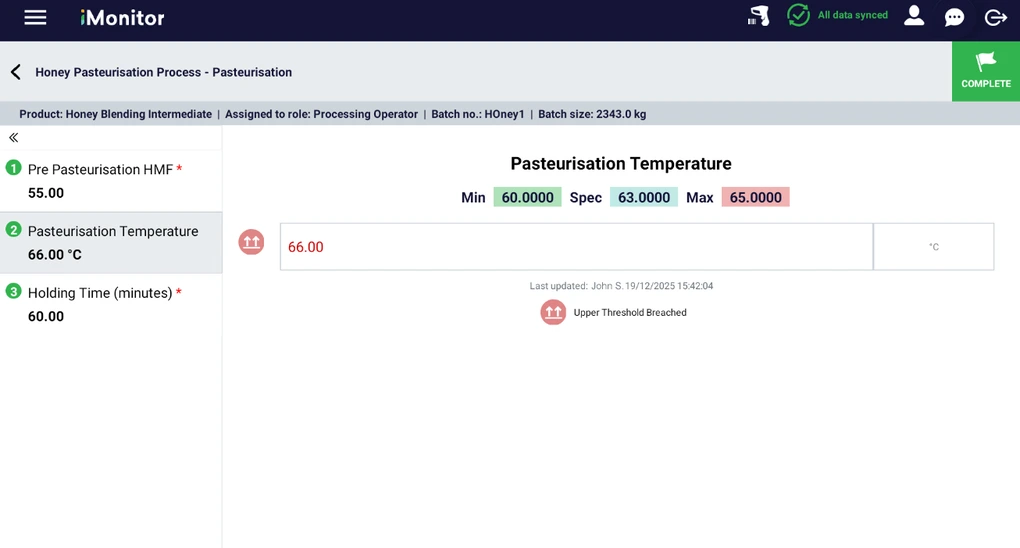
Consistent execution across shifts
When execution lives in binders, spreadsheets, and memory, teams end up improvising. iMonitor turns your best process into the default process.
- Less variation across shifts and lines
- Faster ramp up for new operators
- Fewer missed steps and last-minute surprises
- Digitise SOPs into guided steps with required fields and sign-offs
- Embed checks and targets in each step so the right way is unambiguous
- Capture proof at the point of work with values, photos, and scans
Automation where it matters
Typing weights and readings by hand is slow and error-prone. With connected devices, iMonitor captures the data automatically and keeps the record clean.
- Less manual admin
- Higher data integrity at the point of work
- Faster investigations when something goes out of spec
- Capture weights directly from connected scales, with no retyping
- Pull readings from equipment via IIoT where it adds value, and validate manual entries when it doesn’t
- Auto-calculate yields and reconciliations so operators don’t do math under pressure
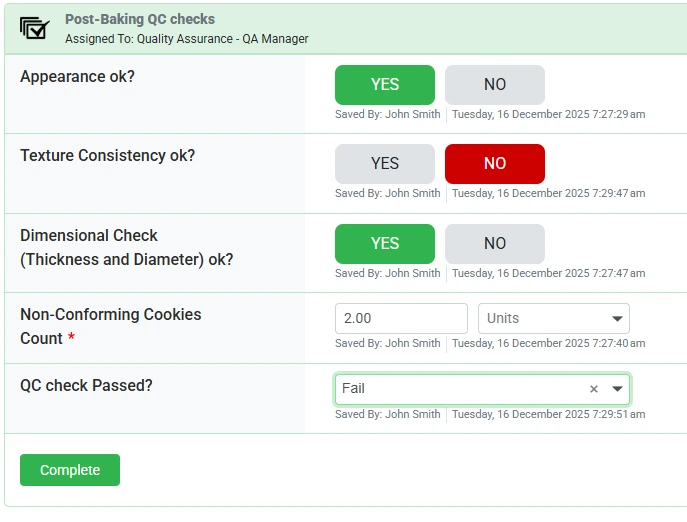
Release-ready quality
Instead of finding issues after the run, iMonitor brings checks forward so teams can correct early and keep product moving.
- Less scrap and rework
- Faster release cycles
- More audit-ready records without the paper chase
- Make quality gates part of execution so steps cannot proceed until compliant
- Capture exceptions with evidence (results, photos, actions) for review by exception
- Generate audit-ready records automatically as work happens
Real-time visibility that keeps teams ahead
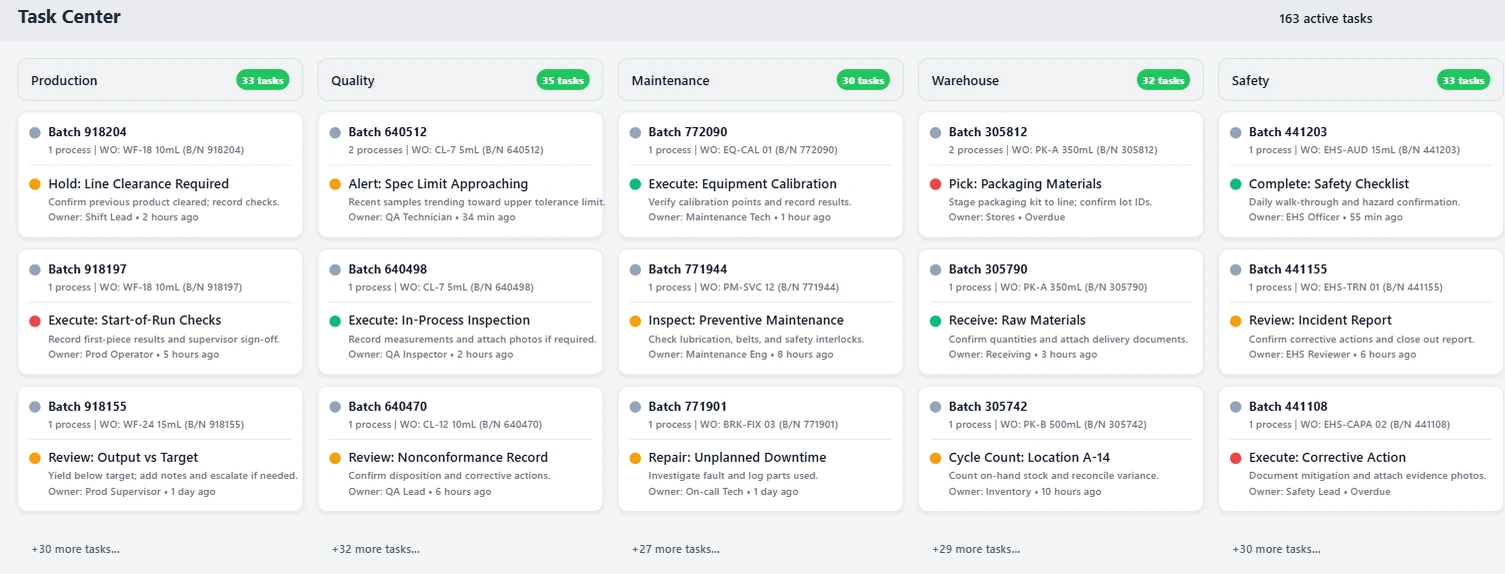
Supervisors shouldn’t have to chase updates. iMonitor makes status, blockers, and overdue work visible early so teams can act before problems spread.
- Less firefighting
- Earlier interventions
- Smoother handoffs between production, QA, and logistics
- Live view of what’s running, blocked, and overdue
- Drill down from a blocker to the exact step and evidence
- Build reports quickly and export to Excel when you need to share
- Alerts and escalation routed to the right roles at the right time
Analytics teams actually use
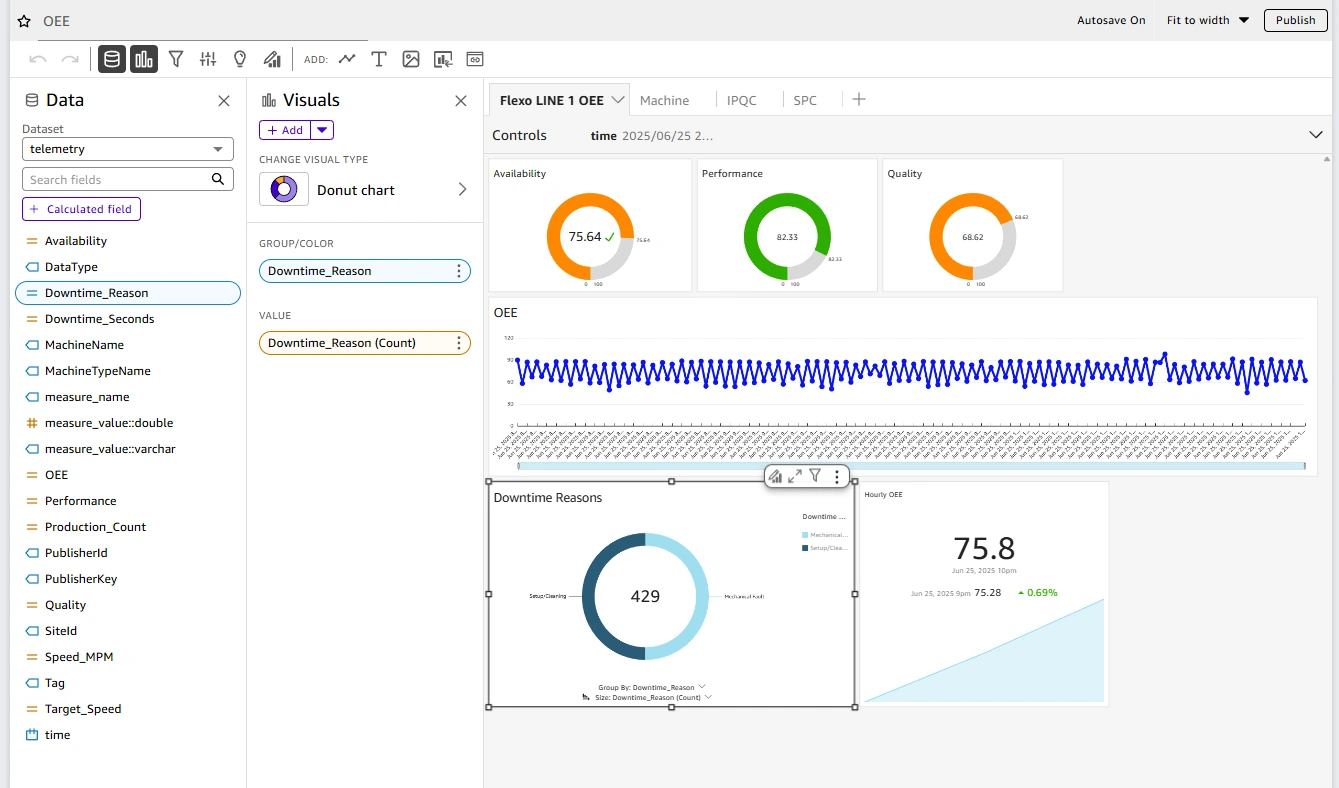
Most dashboards live in a separate tool and lose the operational context. iMonitor keeps analytics tied to what happened on the floor.
- Faster root cause when performance shifts
- Earlier signals when quality is drifting
- Less time building one-off spreadsheets
- OEE and downtime views that stay connected to runs, steps, and operators
- In-process quality trends with limits, so teams spot drift early
- Export and share results without rebuilding the report every time
Traceability you can trust, in seconds
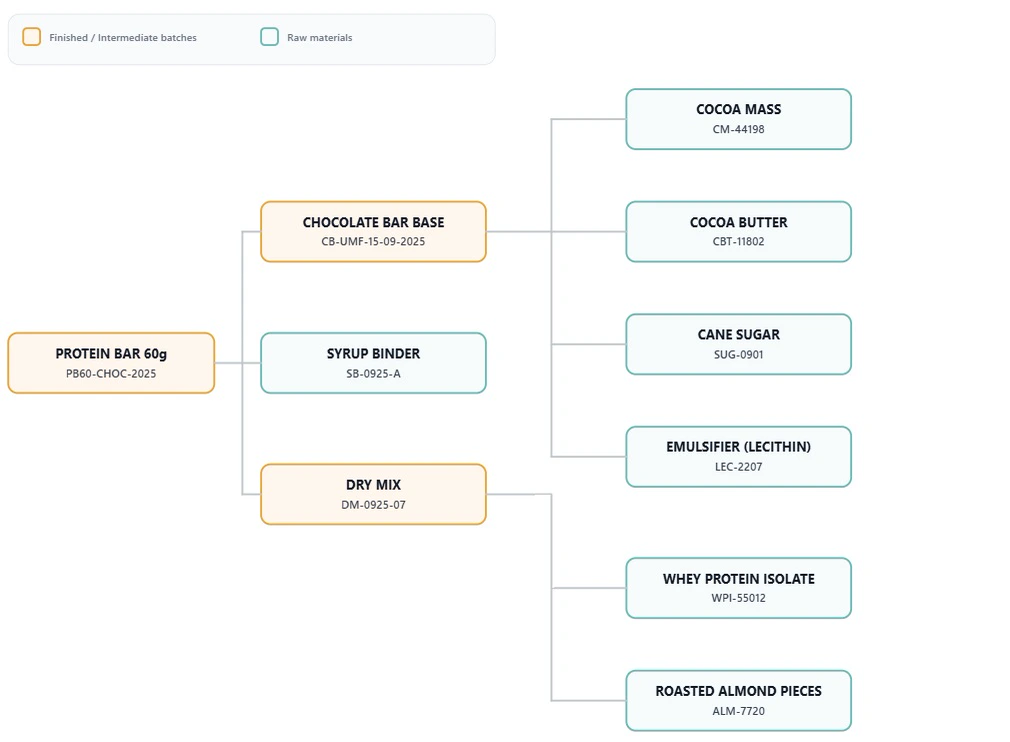
Traceability breaks when materials move faster than paperwork. iMonitor turns scans into structured links so genealogy is instant, not an investigation.
- Prevent wrong/expired additions
- Investigations and recalls in minutes
- Audit-ready proof without the paper chase
- Scan to verify lots at receiving and at point of use (no “trust me” entries)
- GS1-ready capture (GTIN, lot, expiry) with rules that block or warn in step
- One-click genealogy and where-used to trace forward and backward across blends and batches
Improve faster with controlled change
Processes should get better over time. iMonitor makes it easy to improve workflows while keeping change controlled and auditable.
- Faster continuous improvement cycles
- Clear change control and versioning
- Fewer workarounds and “shadow SOPs”
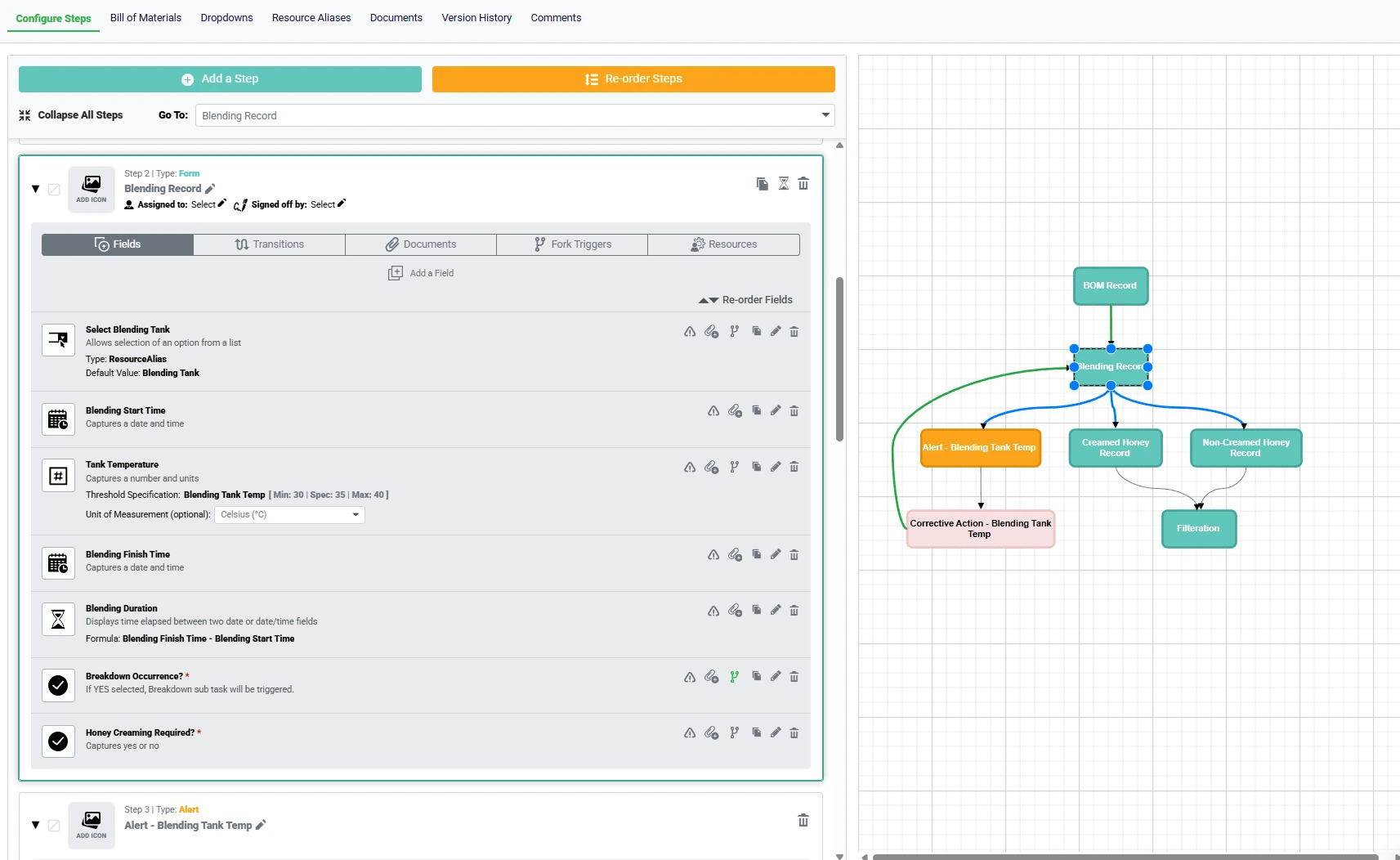
- No-code workflow updates with versioning and publish approvals
- Roll out safely by line, product, or site without breaking execution
- Keep execution controlled while processes evolve
See it against one of your workflows
We’ll map one process together, show exactly how it runs in iMonitor (including automation from scales and IIoT where relevant), and outline a rollout plan that starts small and proves value quickly.